How to Track Intermittent Fasting on Apple Watch
To track fasting on Apple Watch, set up FastTempo on your paired iPhone, install its Watch app, and open it to check your fasting or eating state and time remaining. Tap the Eat/Fast control when you change windows. Apple Watch does not automatically detect when you eat.
For an overview of the Watch timer, controls, and complications, see FastTempo for Apple Watch.
What you need before starting
FastTempo requires iOS 26 or later and watchOS 26 or later. Update both devices if they run an older version. Use the paired iPhone for onboarding, schedule settings, and subscription setup.
FastTempo is a subscription app. The annual plan offers a two-week free trial for eligible subscribers. The other plan bills monthly with a 12-month commitment. Prices and available offers depend on your App Store region. Check the purchase screen for the total commitment, renewal terms, and trial eligibility before subscribing. Watch controls require subscription access, including an eligible active trial.
Install FastTempo on your Apple Watch
- Download FastTempo from the App Store on your iPhone.
- Open FastTempo and complete onboarding. Choose an eating window that fits your routine and review the subscription options.
- On your iPhone, open Apple’s Watch app and select My Watch, then Apps. Find FastTempo under Available Apps and tap Install if it is not already installed.
- Open FastTempo on your iPhone and then on your Watch. Check that the Watch shows your current fasting or eating state.
Apple’s Watch app installation guide also explains how to install apps directly from the Watch App Store.
See the timer before using the controls
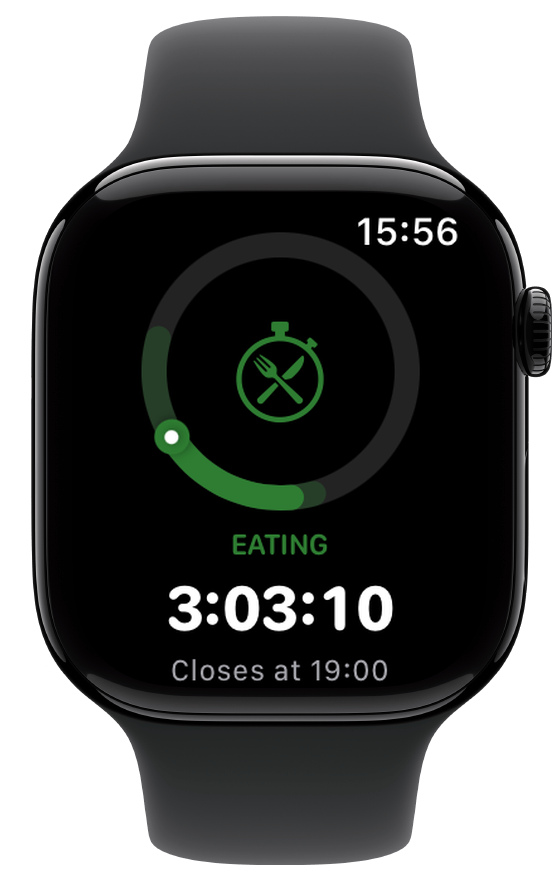
In this demonstration, the current state is Eating, the countdown is 3:03:10, and the eating window closes at 19:00. A countdown describes the current window; it does not tell you that the Watch has detected a meal. For a quick daily-use routine, read the ten-second wrist check.
30-second timer screenshot walkthrough
Start or end a fast from your wrist
- Open FastTempo on your Watch. The timer shows the current state and time remaining.
- Scroll below the timer to find the Eat/Fast control. Tap the control to switch states; it is a button, so you do not need to drag it.
- When you are fasting and start eating, tap the control to switch to Eat. This ends the fast and starts the eating window.
- When you finish eating, tap the control to switch to Fast. This ends the eating window and starts the next fast.
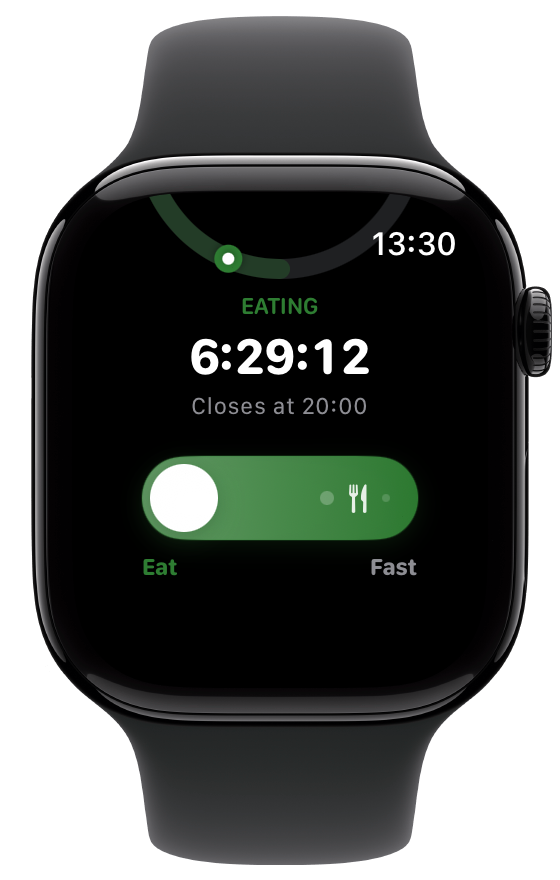
With VoiceOver, the action is announced as “Start eating” or “Start fasting.” If automatic scheduling is enabled, the Watch says “Auto schedule on. Tap to override today.” A manual tap overrides today’s timing.
When fasting is paused, the control is hidden and the Watch shows “Timer paused.” Review your pause settings on the iPhone before trying to change windows. If you see “Subscribe on iPhone,” check your subscription access on the paired iPhone.
Add a FastTempo watch face complication
A complication puts fasting status on a compatible watch face. FastTempo supports circular, rectangular, inline, and corner positions. FastTempo Timer is a separate circular timer-ring option. The options you see depend on the face and position you choose.
- Open the Watch app on your iPhone and choose Face Gallery.
- Choose a face with complication positions.
- Tap a complication position, then select FastTempo, or FastTempo Timer for a compatible circular position.
- Finish customizing the face and tap Add to Watch.
See Apple’s watch face customization instructions for current system controls.
If the app, controls, or complication are missing
- No Watch app: check iOS and watchOS versions, then look for FastTempo in the Watch app’s Available Apps list. Make sure installation has finished.
- “Subscribe on iPhone”: open FastTempo on the paired iPhone and check your subscription or trial. Reopen the Watch app after the iPhone has confirmed access.
- No Eat/Fast control: scroll below the timer. If the timer is paused, check pause settings on your iPhone.
- No complication option: confirm that the Watch app is installed and the chosen face position supports the complication. Try another compatible position.
- Status differs between devices: open FastTempo on both devices, check their connection, and check for app updates. Confirm the state on both before relying on it.
If setup still fails, contact FastTempo support with your device models, iOS and watchOS versions, and what you see on screen.
Do you need your iPhone nearby?
Set up and confirm FastTempo on the paired iPhone first. Apple’s guide to using Apple Watch without its iPhone explains how the Watch’s connection affects available functions. It does not guarantee how a third-party app will sync.
When you return to your iPhone, open FastTempo on both devices and check that the fasting or eating state agrees. Do not assume every change has reached the other device while they are disconnected.
Keep the routine practical
Choose a schedule you can repeat and adjust it when your routine changes. You do not need to log calories or meals to use FastTempo’s timer. The iPhone app is the place to review your history and change your schedule. If you are just setting up the timer, the first-week product introduction explains the optional graduated start.
This article is for general wellness education and app guidance. It is not medical advice. If fasting makes you feel unwell, stop and speak with a qualified clinician. If you are pregnant, under 18, have a medical condition, take medication, or have a history of disordered eating, ask a qualified clinician whether fasting is appropriate for you.
Download FastTempo for iPhone and Apple Watch, then review the annual price and renewal terms in the app. The annual plan renews after an eligible 14-day full-access trial unless you cancel. Trial eligibility and the exact price appear on the purchase screen.